Philosophy
Are you tired of creating or begging for practical journals from everyone, modifying it, and pretending you did all the work like a politician?
If yes, then this site is for you. Simply print the chapter or practical you want, add your roll number, and Voila!, You're done
Support

If you want to support my work, the least you can do is star the repository on GitHub. Plis.
Built using mdbook, content files written in MarkDown
- Roll number:
- Name:
Practical 1 - Building a simple calculator
- Create a new Java Web application in Netbeans IDE
- Name the application to something like “TYIT”
- Click Next
- Select Glassfish server
- Click Next and Finish (do not add any frameworks)
index.html
<!DOCTYPE html>
<html>
  <head>
    <title>calculator</title>
  </head>
  <body>
    <form action='Calculator' method='get'>
      First No. <input type="text" name="t1"><br>
      Second No. <input type="text" name="t2"><br>

      <select id="drop" name='t3'>
        <option value="1">add</option>
        <option value="2">sub</option>
        <option value="3">div</option>
        <option value="4">multi</option>
      </select>

      <input type='submit' value="submit">

    </form>
  </body>
</html>
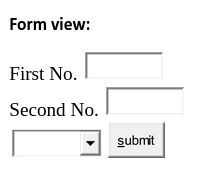
- Create a new Servlet “Calculator.java” in the default source package Calculator.java
@WebServlet(urlPatterns = {"/Calculator "})
public class Calculator extends HttpServlet {
    protected void processRequest(
        HttpServletRequest request,
        HttpServletResponse response
    )
        throws ServletException, IOException {
            response.setContentType("text/html;charset=UTF-8");
            try (PrintWriter out = response.getWriter()) {
                /* TODO output your page here. You may use following sample code. */
                out.println("<!DOCTYPE html>");
                out.println("<html>");
                out.println("<head>");
                out.println("<title>Servlet NewServlet</title>");
                out.println("</head>");
                out.println("<body>");
                int a=Integer.parseInt(request.getParameter("t1"));
                int b=Integer.parseInt(request.getParameter("t2"));
                int opt=Integer.parseInt(request.getParameter("t3"));

                switch(opt) {
                    case 1 :
                        out.println("<h1>Addition of the given numbers: "+(a+b)+"</h1>");
                        break;
                    case 2 :
                        out.println("<h1>Subtracion of the given numbers: "+(a-b)+"</h1>");
                        break;
                    case 3 :
                        out.println("<h1>Division of the given numbers: "+(a/b)+"</h1>");
                        break;
                    case 4 :
                        out.println("<h1>Multiplication of the given numbers: "+(a*b)+"</h1>");
                        break;

                }
                out.println("</body>");
                out.println("</html>");
            }
        }
    // Doget and Dopost methods
}
- Build and run the project by pressing the green play button.
- Go to http://localhost:8080/TYIT/index.html
- Enter any number in number 1 and number 2, select any operator like add, Hit submit, you’ll be taken to this screen
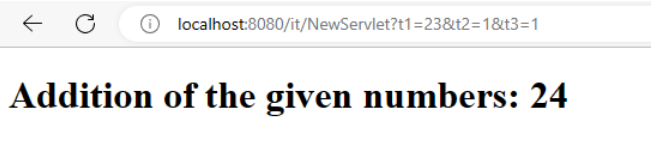
- Roll number:
- Name:
Practical 2 - Building a simple login form
- Create a new Java Web application in Netbeans IDE
- Name the application to something like “TYIT”
- Click Next
- Select Glassfish server
- Click Next and Finish (do not add any frameworks)
index.html
<!DOCTYPE html>
<html>
  <head>
    <title>login form</title>
  </head>
  <body>
    <form action="NewServlet" method="get">
      Username <input type="text" name="u"><br>
      Password <input type="text" name="p"><br>

      <input type="submit" value="submit">

    </form>
  </body>
</html>
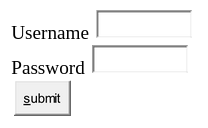
- Create a new Servlet “NewServlet.java” in the default source package NewServlet.java
@WebServlet(urlPatterns = {"/NewServlet"})
public class NewServlet extends HttpServlet {

    protected void processRequest(HttpServletRequest request, HttpServletResponse response)
            throws ServletException, IOException {
        response.setContentType("text/html;charset=UTF-8");
        try (PrintWriter out = response.getWriter()) {
            /* TODO output your page here. You may use following sample code. */
            out.println("<!DOCTYPE html>");
            out.println("<html>");
            out.println("<head>");
            out.println("<title>Servlet NewServlet</title>");
            out.println("</head>");
            out.println("<body>");
            String user = request.getParameter("u");
            String pass = request.getParameter("p");
            if (pass.equalsIgnoreCase("sys"))
                out.println("<h1>Hello "+user+"</h1>");
            else
            out.println("<h1>login failed</h1>");
            out.println("</body>");
            out.println("</html>");
        }
    }
}
This is to be created in the default source package
- Save all files and then right click the java file and select “Run file”
- You will be taken to the browser
- Enter any username and password
- Click login
Output